Bioconversion with Optimization
The first step is to select “Cell” > “Run All” from the toolbar. This will initialize all the widgets and allow you to interact with the unit operation options via the GUI controls.
[24]:
import os
import numpy as np
from ipywidgets import widgets

# imports from virteng modules
from virteng.WidgetFunctions import csv2widget_collection
from virteng.OptimizationFunctions import Optimization
from virteng.Utilities import get_host_computer

hpc_run = get_host_computer()  # See if we're running on Eagle or on a laptop

from IPython.display import Image, HTML, clear_output
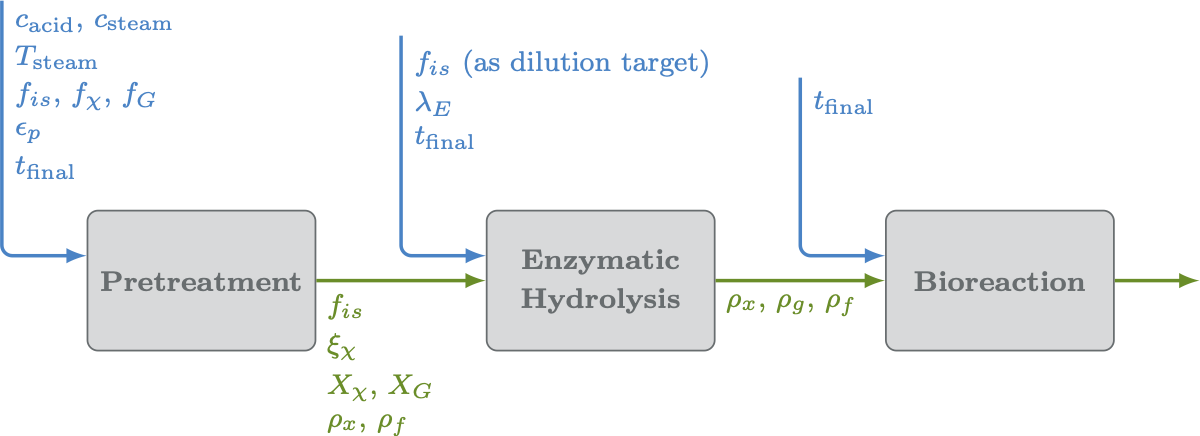
Image(os.path.join(os.path.dirname("__file__"), 'figures', 'three_unit_flow.png'), width=800)
It looks like you're running this notebook on a laptop.
Operations requiring HPC resources will be disabled.
[24]:
Load Virtual Engineering Options
[25]:
# Get default feedstock properties from file
fs_options = csv2widget_collection("./default_params/feedstock_params.csv")
fs_options.display_all_widgets()
[26]:
# Get default pretreatment properties from file
pt_options = csv2widget_collection("./default_params/pretreatment_params.csv")
pt_options.display_all_widgets()
[27]:
# Get default enzymatic hydrolysis properties from file
eh_options = csv2widget_collection("./default_params/enzymatic_hydrolysis_params.csv")
eh_options.display_all_widgets()
[28]:
# Get default bioreactor properties from file
br_options = csv2widget_collection("./default_params/bioreactor_params.csv")
br_options.display_all_widgets()
Choosing objective for optimization
[29]:
obj_widget = widgets.Dropdown(
    options=[('Biorector:            OUR',   ('br_out', 'our')),
             ('Enzymatic Hydrolysis: rho_g', ('eh_out', 'rho_g')),
             ('Enzymatic Hydrolysis: rho_x', ('eh_out', 'rho_x')),
             ('Enzymatic Hydrolysis: rho_sL',('eh_out', 'rho_sL')),
             ('Enzymatic Hydrolysis: rho_f', ('eh_out', 'rho_f')),
             ('Pretreatment:         fis_0', ('eh_out', 'fis_0')),
             ('Pretreatment:         X_X',   ('eh_out', 'X_X')),
             ('Pretreatment:         X_G',   ('eh_out', 'X_G')),
             ('Pretreatment:         rho_x', ('eh_out', 'rho_x')),
             ('Pretreatment:         rho_f', ('eh_out', 'rho_f'))
            ],
    value=('br_out', 'our'),
    description='Objective:',
    tooltip = 'Specifies the objective to use in optimization.'
)

display(obj_widget)
Parameter Sweeps
[30]:
#================================================================
sweep_button = widgets.Button(
    description = 'Run Sweep.',
    tooltip = 'Execute the model start-to-finish with the properties specified above.',
    layout =  {'width': '200px', 'margin': '25px 0px 100px 170px'},
    button_style = 'primary'
)
#================================================================
display(sweep_button)
#================================================================
# Define a function to be executed each time the run button is pressed
def sweep_button_action(b):
    clear_output()
    display(sweep_button)
    Opt = Optimization(case_folder='./', options_list=[fs_options, pt_options, eh_options, br_options], obj_widjet=obj_widget, hpc_run=hpc_run)
    Opt.parameter_grid_sweep(nn=10, results_file='sweep_params.csv')

sweep_button.on_click(sweep_button_action)
#===============================================================
[31]:
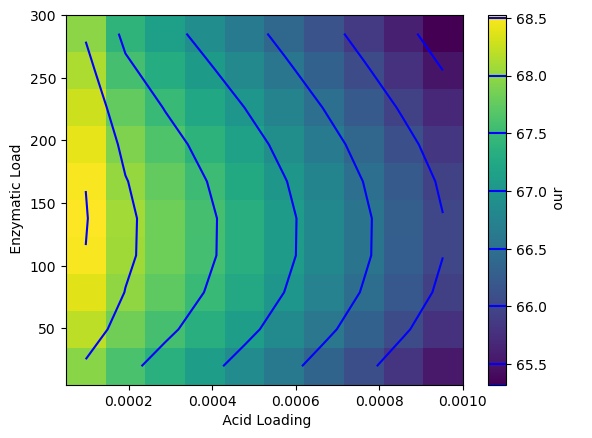
import matplotlib.pyplot as plt

param_sweep_fn = 'sweep_params.csv'
if os.path.exists(param_sweep_fn):
    with open(param_sweep_fn, 'r') as f:
        firstline = f.readline().split(',')
    Opt = Optimization(case_folder='./', options_list=[fs_options, pt_options, eh_options, br_options], obj_widjet=obj_widget, hpc_run=hpc_run)
    sweeps = np.loadtxt(param_sweep_fn, delimiter=',', skiprows=1)
    bounds = Opt.var_real_bounds
    extent = bounds[0][0], bounds[0][1], bounds[1][0], bounds[1][1]
    nn = int(np.sqrt(len(sweeps)))
    OUR = sweeps[:, 3].reshape(nn, nn)
    shw = plt.imshow(OUR.T, extent=extent, aspect='auto', origin='lower')
    _cs2 = plt.contour(OUR.T, levels=np.arange(65, 69, 0.5), extent=extent, origin='lower', colors='blue')
    bar = plt.colorbar(shw)
    bar.add_lines(_cs2)
    bar.set_label(firstline[-1])
    plt.xlabel(firstline[1])
    plt.ylabel(firstline[2])
Objective "our" is in br_out.
On each iteration running n=3 models

Initializing Pretreatment Model
Initializing Enzymatic Hydrolysis Model
Initializing Bioreactor Model
Optimizing Acid Loading.
Optimizing Enzymatic Load.
Optimization
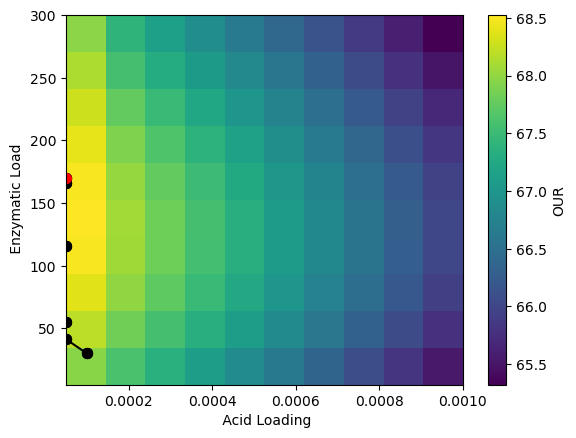
Press the Optimize button below to launch the optimization of the start-to-finish operation using the above values as initial conditions.
This example maximizes OUR by changing user-specified control options.
[32]:
opt_button = widgets.Button(
    description = 'Optimize.',
    tooltip = 'Optimize for OUR using the conditions above as an initial guess.',
    layout =  {'width': '200px', 'margin': '25px 0px 25px 170px'},
    button_style = 'warning'
)
display(opt_button)
#================================================================
# Define a function to be executed each time the run button is pressed
def opt_button_action(b):
    clear_output()
    display(opt_button)

    Opt = Optimization(case_folder='./', options_list=[fs_options, pt_options, eh_options, br_options], obj_widjet=obj_widget, hpc_run=hpc_run)
    opt_result = Opt.scipy_minimize(Opt.objective_function, opt_results_file='optimization_results.csv')
    print(opt_result)

opt_button.on_click(opt_button_action)
#================================================================
[33]:
opt_results = np.loadtxt('optimization_results.csv', delimiter=',', skiprows=1)
shw = plt.imshow(OUR.T, extent=extent, aspect='auto', origin='lower')
bar = plt.colorbar(shw)
bar.set_label('OUR')
plt.xlabel(firstline[1])
plt.ylabel(firstline[2])
plt.scatter(opt_results[:, 1], opt_results[:, 2], s=50, c='k', marker='o')
plt.plot(opt_results[:, 1], opt_results[:, 2], color='k')
plt.scatter(opt_results[-1, 1], opt_results[-1, 2], s=50, c='r', marker='o')
plt.show()
[34]:
a = HTML('''<script>
code_show=true;
function code_toggle() {
 if (code_show){
 $('div.input').hide();
 } else {
 $('div.input').show();
 }
 code_show = !code_show
}
$( document ).ready(code_toggle);
</script>
<form action="javascript:code_toggle()"><input type="submit" \
value="Toggle code visibility (hidden by default)."></form>''')

display(a)
[ ]: